JustClock for Trae – Work Time Tracking for the AI-Native Code Editor
Work Time Tracking for Trae, the Free AI-Native Code Editor.
JustClock runs inside Trae, ByteDance's free AI-native code editor, the same way it does in VS Code and Cursor — quietly logging the time you actually spend working, whether you're in Chat mode or letting Builder mode run — no stopwatch needed.
Builder mode can plan, write and run code across your project on its own, but someone still has to define the task, review every change and own the result. JustClock keeps that time accounted for.
Why Track Time in an AI Editor Like Trae?
- Clients and managers still bill and budget by the hour, regardless of how much Builder mode automated
- Tracks the time you spend prompting, reviewing and fixing AI-generated output, not just typing
- Gives you real data on where Trae's free access to top models actually saves time on your projects
- Works per-project, so you can compare effort across clients or repos
Switching between Trae, Cursor and plain VS Code? The Cursor page and VS Code page have the same setup steps.
Secure by design. Non-intrusive by default.
We understand that security is paramount inside your development environment. JustClock measures time — never your work.
Data we collect
- Project name / identifier
- Active time spent in IDE
- User account identifier
What we never touch
- Your code or file contents
- Keystrokes or sensitive input
- Any other personal data
For full details, please refer to our Privacy Policy.
How to Set Up Your Trae Editor & API Key
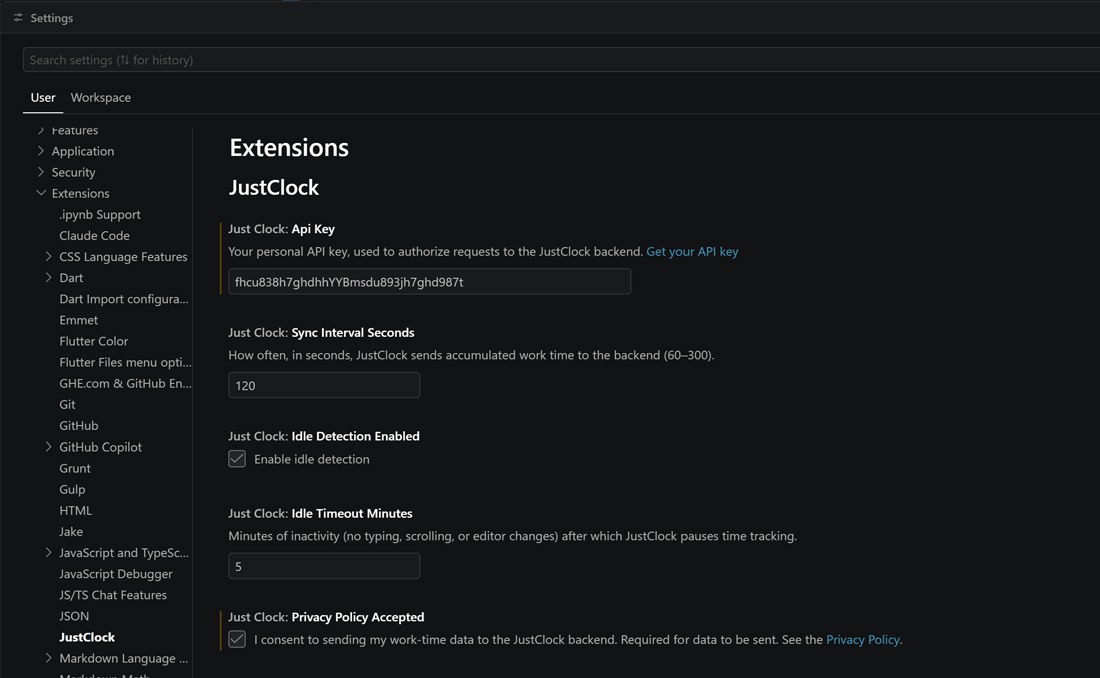
Install the extension from the Open VSX Registry — Trae, like Cursor and other VS Code forks, pulls extensions from there, not the VS Code Marketplace.
Open Settings (Ctrl/Cmd + ,) and search for "JustClock".
Get your API key from our website.
Paste the key to save.