JustClock for Visual Studio Code – Automatic Work Time Tracking Extension
Automatic Work Time Tracking for Visual Studio Code.
JustClock is a lightweight VS Code extension that logs your coding time in the background — no timers to start, no manual entries to remember.
It sits quietly next to your existing extensions and sends work data in minute-level intervals, so nothing gets lost even if VS Code closes unexpectedly.
Built for the VS Code Workflow
- Runs alongside your existing extensions without conflicts
- Doesn't touch your
settings.jsonor workspace files - Tracks time per project automatically as you switch folders
- Works the same way whether you code JavaScript, Python, Go or anything else
Also using Cursor? The same extension works there too — see the dedicated Cursor page.
Secure by design. Non-intrusive by default.
We understand that security is paramount inside your development environment. JustClock measures time — never your work.
Data we collect
- Project name / identifier
- Active time spent in IDE
- User account identifier
What we never touch
- Your code or file contents
- Keystrokes or sensitive input
- Any other personal data
For full details, please refer to our Privacy Policy.
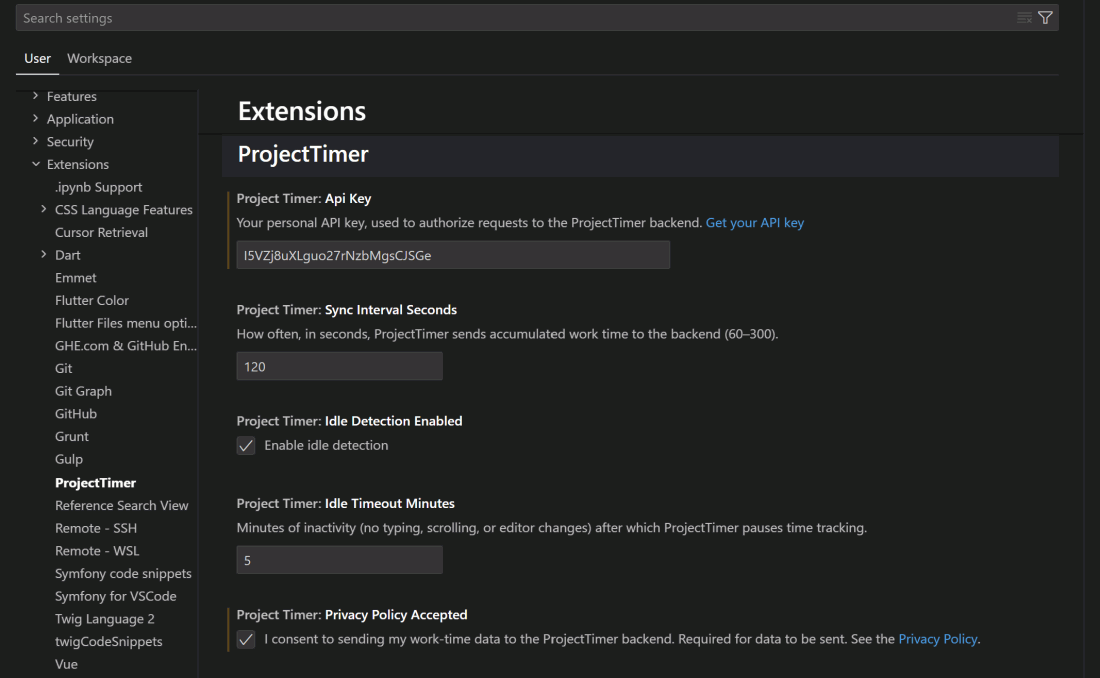
How to Set Up Your Visual Studio Code IDE & API Key
Install the extension from the Visual Studio Marketplace.
Open Settings (Ctrl/Cmd + ,) and search for "JustClock".
Get your API key from our website.
Paste the key to save.