JustClock for DataGrip – Automatic Work Time Tracking for Database Professionals

Automatic Work Time Tracking for DataGrip.
JustClock tracks the hours you spend in DataGrip — writing queries, designing schemas, reviewing execution plans — across PostgreSQL, MySQL, MariaDB, SQL Server, Oracle, MongoDB and every other database DataGrip connects to.
Time is captured per project and sent in minute-level intervals, so a long-running query, an export job or a forgotten stopwatch never means lost billable hours.
Built for Database Professionals
- Tracks time separately for every connection and project, whether it's one database or a dozen
- Works the same across every engine DataGrip supports — SQL and NoSQL alike
- Built for DBAs, data engineers and consultants who bill clients by the hour for schema work, migrations and query tuning
- Keeps running through long queries, data exports and console sessions without getting in the way
Also writing application code, not just SQL? The same free plugin works in IntelliJ IDEA, PyCharm and every other JetBrains IDE.
Secure by design. Non-intrusive by default.
We understand that security is paramount inside your development environment — especially one connected to live databases. JustClock measures time — never your data or your queries.
Data we collect
- Project name / identifier
- Active time spent in IDE
- User account identifier
What we never touch
- Your database contents or query results
- Connection strings, credentials or keystrokes
- Any other personal or sensitive data
For full details, please refer to our Privacy Policy.
How to Set Up Your DataGrip IDE & API Key
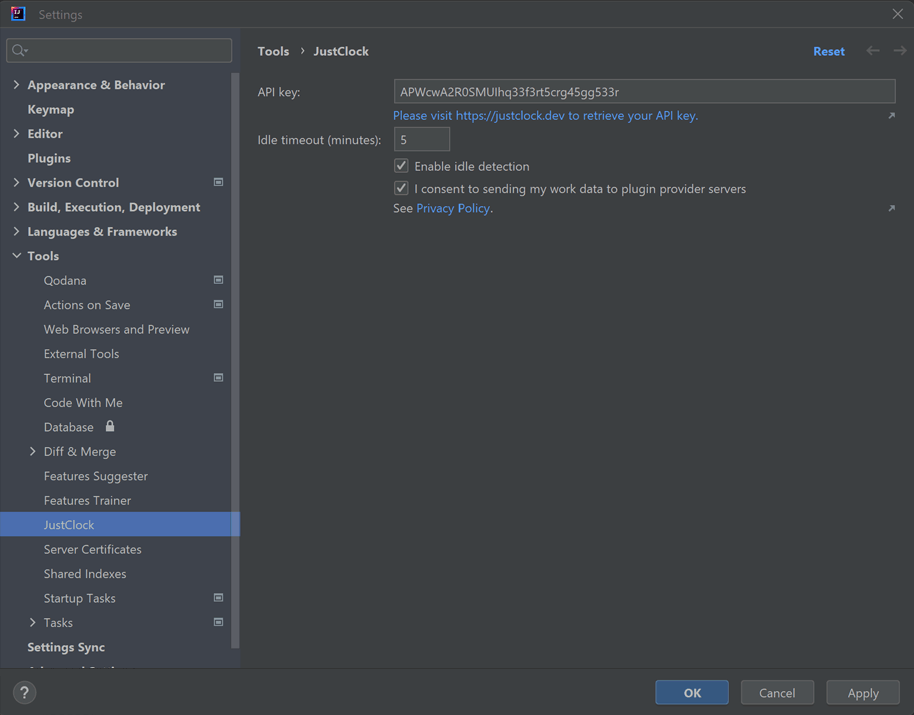
Install the plugin from the JetBrains Marketplace.
Go to Settings > Tools > JustClock.
Get your API key from our website.
Paste the key and hit "OK".